


Screen your candidates for price opportunities
A screener finds stocks that meet your chosen conditions. This example starts with companies you have already researched on a Candidates watchlist, then checks their prices. You can change the rules to suit your own approach.
A result is a company to review, not an automatic buy signal. A price below fair value may reflect a business problem or an estimate that is too optimistic.
1. Open or create a screener
Sign in and open Screener from the side menu. You can begin with a system screener to find ideas. Open its editor to see the filters and use Save as new to keep your own version. System screeners are shared examples.
For this example, choose + New screener, give it a name such as Candidates below fair value, and choose Create. Use + Add filter to add the rows below.
Build your researched candidate list first using the watchlist guide. That separates your opinion of the business from today's price.
2. Start with two filters
On a small screen, swipe the table sideways to read all columns.
| Setting | Example choice | What it does |
|---|---|---|
| Watchlist | is one of → Candidates | Only stocks on your chosen list can pass. |
| Last Close Price | less than → Metric → Fair Price at Latest Close (Growth 2Y), offset 0% | The latest closing share price must be below this fair-price estimate. Leave or N/A unchecked. |
Last Close Price means the last recorded closing price, not a live quote. Fair Price at Latest Close (Growth 2Y) is a calculated value using the two-year expected growth method and the earnings figure used for the latest close date.
The label Growth 2Y means the valuation uses expected growth in earnings per share over two years. Earnings per share, or EPS, means the company's profit for each share. The valuation bases guide explains the assumptions. This is a named screener measure; it does not automatically follow a different method you select on a stock page.
Choose Metric to compare two figures for each stock. For example, compare its closing price with its fair price. Choose Value to compare a figure with a number you type, such as Quality Score of at least 60.
3. Understand offsets, missing numbers and combined rules
- Offset 0%: compare directly with the chosen measure. If fair price is $100, “Last Close Price less than Fair Price + 0%” requires a price below $100.
- Offset -10%: require a price below $90 when fair price is $100. Enter -10 in the offset field. A positive 10 instead compares with $110. These are examples, not recommended discounts.
- or N/A: N/A means a number is unavailable. Checking this box lets that row pass when a required comparison number is missing. For a Metric comparison, that applies to either side. Leave it unchecked when you need evidence that price is below fair value.
- All rows must pass: a stock must meet the watchlist rule and every other filter. Several fair-price rows mean it must pass each comparison, not just one.
- is one of: within a list row, any of the selected choices can match. For example, choosing Candidates and Research further includes stocks on either watchlist.
If nothing matches, check the list first, then try fewer filters. Do not switch on or N/A merely to make a price filter return more stocks: a missing value does not show that a stock is cheap.
4. Read the fuller example
The screenshot adds several conditions to a researched candidate list. You do not need all of them. The table explains the visible rows and the choices they represent.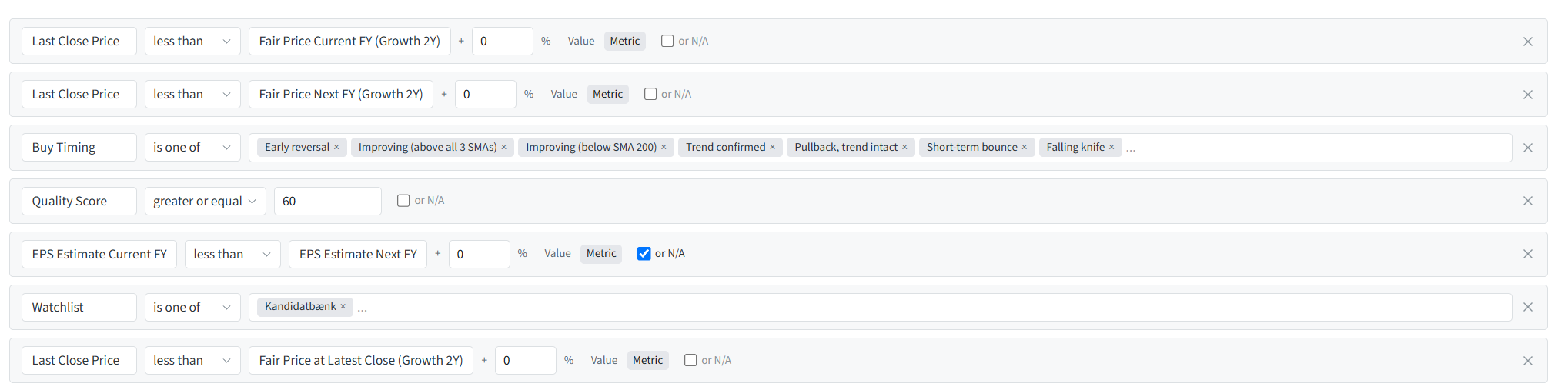
On a small screen, swipe the table sideways to read all columns.
| Row in the example | How to set it | Meaning |
|---|---|---|
| Current-year fair price | Last Close Price → less than → Metric → Fair Price Current FY (Growth 2Y), 0%; or N/A off | Price must be below the estimate using expected profit per share for the current financial year. FY means financial year: the company's reporting year, which may differ from the calendar year. |
| Next-year fair price | Last Close Price → less than → Metric → Fair Price Next FY (Growth 2Y), 0%; or N/A off | Price must also be below the estimate using expected profit per share for the next financial year. |
| Buy Timing | is one of → your chosen states | Choose which price-trend states to include. The visible choices include Early reversal, Improving (above all 3 SMAs), Improving (below SMA 200), Trend confirmed, Pullback, trend intact, Short-term bounce and Falling knife. The dots mean more choices may be hidden. |
| Quality Score | greater or equal → Value → 60; or N/A off | Requires a quality score of at least 60. This is an example threshold, not a universal definition of a good company. |
| Expected profit growth | EPS Estimate Current FY → less than → Metric → EPS Estimate Next FY, 0%; or N/A on | Expected profit per share must be higher next year, or one of the compared estimates may be missing. The checked box means this row does not always establish expected growth. Other rows still apply. |
| Watchlist | is one of → Kandidatbank in the image; choose Candidates for this walkthrough | Limits results to your selected list. The name is your choice. |
| Fair price at the latest close | Last Close Price → less than → Metric → Fair Price at Latest Close (Growth 2Y), 0%; or N/A off | Also requires price below the fair-price estimate at the latest close date. This is a different comparison from the current- and next-year figures. |
An SMA is a simple moving average: an average price over a set number of trading days. SMA 200 uses 200 trading days. Buy Timing describes price behaviour, not company quality. In particular, Falling knife describes a sharp ongoing fall. Including it allows those stocks into the results; it does not make them safe to buy.
The three fair-price tests use related assumptions, so they are not three independent confirmations that the estimate is right. Decide which comparisons answer your own questions.
5. Run, review and save
- Choose Run screener to see which stocks match your current settings. Running does not save edited rules.
- Open a result, review your personal note and check the current business news and the assumptions behind fair value. Investigate a large price fall before treating it as an opportunity.
- Use Edit columns if you want to show other figures in the results, then run again. Changing displayed columns does not add filter rules.
- Choose Save to keep changes to your own screener, or Save as new to keep a separate version.
- Rerun it as prices, company data and your candidate list change. A saved screener is a saved set of rules, not a permanent set of matching stocks.
A matching stock may still belong in Research further or Researched, but no thanks. Return to the example research workflow before deciding what to do.